

MOC means “My Own Creation”: a custom-designed brick model. You can design your own or follow instructions for another designer’s shared model. Before committing, check the piece count, number of steps, height in centimetres and footprint in studs.
What makes a brick-built model a MOC?
The “own” in MOC refers to the designer’s creation. You can still build it from instructions. Designing means choosing the model’s form and how its parts fit together; following a shared design means working from those decisions. A custom design remains a MOC when another builder follows its manual.
Useful instructions for brick-built models let you inspect both the overall shape and the placement of individual parts. At BrickLab, we publish brick sculptures with three ways to check that information:
- Rotatable 3D model: turn the model to inspect it from different angles rather than relying on a single view.
- Per-step parts lists: check which parts you need for the current step.
- Layer map: see where each part goes, alongside the step-by-step manual.
Use the 3D view to understand the shape, then read the parts list and layer map together to match each required piece to its position.
Choose a model that fits your space and parts
Our 106 free real-part sets are brick-built models made from real standard parts, all free to open and build. Compare their piece counts, steps, height and footprint side by side before choosing by finished appearance alone.
- Pieces: use the total to gauge how many parts you need, then check the inventory against your collection. The total alone cannot tell you whether you have the right parts.
- Steps: check this separately from the piece count; it tells you how the instructions divide the build. Neither figure establishes build time.
- Height in centimetres: compare it with the clear space above your display surface, especially beneath a shelf.
- Footprint in studs: check the space the model occupies against the area you can give it.
A model that fits your shelf may still need parts you do not own. We recommend checking both space and inventory as you narrow your choice, before committing to a parts order.
Read the inventory before ordering or sorting
We recommend checking part types, lots and colour quantities wherever they are supplied before making a shopping list. Part types tell you which shapes you need; lots distinguish part-and-colour combinations. Having the right shape only covers the requirement if you also have it in the specified colour.
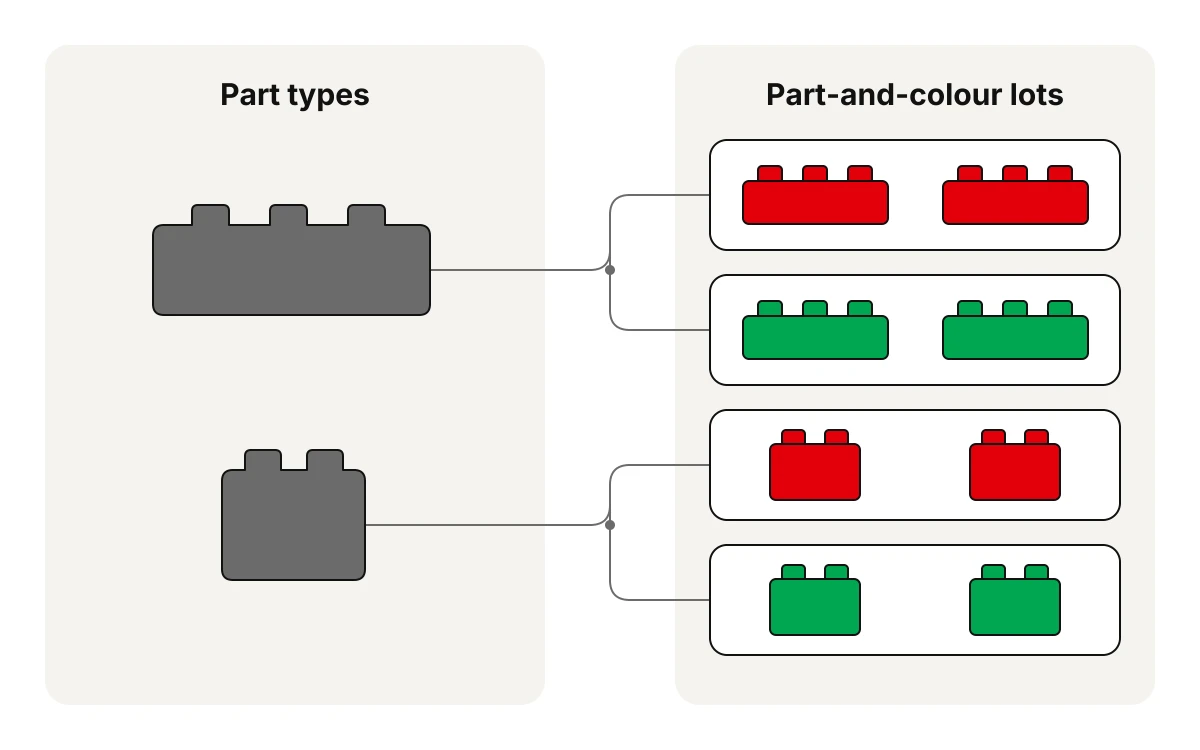
- Compare each required quantity with the parts you have in the specified colour. Record the shortfall rather than ordering the full inventory.
- Check any shapes you are unsure of in our parts library. It shows every brick, plate, tile, slope and round in 3D, with its specifications and the builds that use it. Check the shape before counting it towards your stock.
- Keep similar colours in separate labelled trays or bags rather than one mixed pile. Maintain those distinctions as you sort, so the quantities you set aside match the inventory.
Prepare for your next build
Inspect the opening steps and their parts lists, then decide what to lay out first.
If you’re still choosing a model, browse the relevant BrickLab real-part sets collection: landmarks (26), buildings (45), vehicles (27) or objects (8). Pick the subject you want to display, then narrow your options with the same space and inventory checks.